INTRODUCTION TO NODEJS
What is Node.JS ?

Node js was developed by Ryan Dahl who worked at JOYENT in 2009
Creation of node js help to easily build fast and salable network applications.
 |
| Ryan Dhal |
a lightweight & efficient framework.
it is ideal for real-time data intensive application run across distributed systems.
most importantly node js is an opensource cross-platform run-time environment written in one of most popular language JavaScript.
also it can be run on windows as well as OS X and Linux.
Node js provide user with many libraries of various java-script modules that are simplifies the development process of web applications.
Node js comes with Run-time environment + java script libraries
Node js 'npm' is the largest set of libraries around opensource world. it;s called nodeJS Eco-system.
None blocking I/O Explained
In node Js it does not wait for some process to finish and give an output. it performs other operations and continue to work.this helps node js to work faster. but to simply do multiple processes there should be a thread support ! so how single threaded nodeJS achieve this ? This is where event loop come to the play.
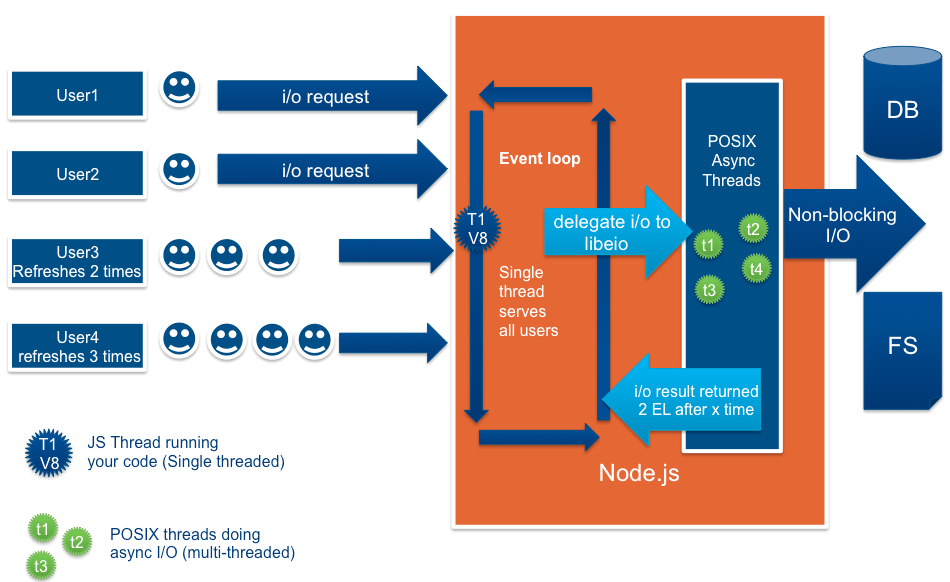
Node has a pool of threads in play and it uses continues lock-down of threads during operations
so it can continue event loop without blocking.
where to use node js?
- i/o based applications
- data streaming applications.
- data intensive real-time applications,c
- JSON API based applications
- single page applications
Most of the popular web applications use node js like
- papal
- E bay
- Netflix
- uber
Advantages of using node js
- ability to use single programing language from one end of the applications to the other end
- node js applications are easy to scale .
- Deliver improved performance since v8 engine integrated. (v8 engine compiles the js code in to machine code directly)
- Easily extensible
- support for common tools like JUNIT
- well build npm package manager and its large number of reusable modules.
Disadvantages
- actual number of robust libraries are comparatively low.
- Not recommended for computationally intensive tasks.
- Asynchronous model is complex than synchronous model.
Node package manager
- Reusable Node Js components are available in online repositories.
- Built in version and dependency managers.
- built in scripting mechanism.
- Global installations may available throughout the system while local installations will only be available for that particular application
- By default all dependencies will get installed in 'node_modules' directory.
- 'package JSON' contains all information related to nodeJS.
- it also contains Name ,version ,as well ass author ,repository ,required node version scripts and dependencies
NOTE: To denote compatible version with node js npm has a way of defining them.
- Less than or equal denoted by - < =
- Greater than or equal denoted by - >=
- Compatible with denoted by - ^
- Any denoted by - * or 1.2.x
- Latest denoted by - latest
The two types of dependencies are
- Dev_dependencies (development time dependency).
- Application run time dependency
Node JS requires...
Node js follws common JS patten when loading modulesIt requires several modules get loaded synchronously and will be cached after the first use.


Comments
Post a Comment