LEARN THE BASICS OF OBJECT ORIENTED PROGRAMMING (OOP) CONCEPTS
Java is one of the main programming language and we aim to help developers become better developers, we’re taking a look at some of the foundational concepts in the Java programming language. Read on for a primer on OOP concepts in Java.
Object Oriented programming is a programming style which is associated with the concepts like class, object,

- Inheritance
- Encapsulation
- Abstraction
- Polymorphism
and let us look at each other with clear idea of each so that we can understand it properly.
- Inheritance : Inheritance is a feature of object-oriented programming that allows code reusability.It allow us to re use the codes we previously coded.why ? It aims to save time and resources and reduce redundancy by taking advantage of assets that have already been created .we need it becouse we can make childrens that has same properties as parent class and contain something special. for example think of a class that has Toy properties.so the base class (parent) has a color ,type and its made of plastic when we inherit from the base class for another toy (Ex:lorry with crane or a police car with siren) of course the child class has same properties as parent which is colour and it made of plastic.but also the lorry has a special property called crane.so with inheritance we can use the same properties and methods applied for toy class to lorry class without coding it twise.


- lets look at another example :-
- this uses javascript to demonstrate
using System;

namespace InheritanceExample
{
  public class humanBeing
  {
    public humanBeing()
    {
      Console.WriteLine("Calling the human being class constructor");
    }
    public void Display()
    {
      Console.WriteLine("I'm a human being");
    }
  }

  public class Man:humanBeing
  {
    public Man()
    {
      Console.WriteLine("I'm a man, a male human being");
    }
  }

  public class Program
  {
    static void Main(string[] args)
    {
      Man yann = new Man();
      yann.Display();
      Console.ReadKey();
    }
  }
}
Hope you understand inheritance now.
let's talk about Encapsulation
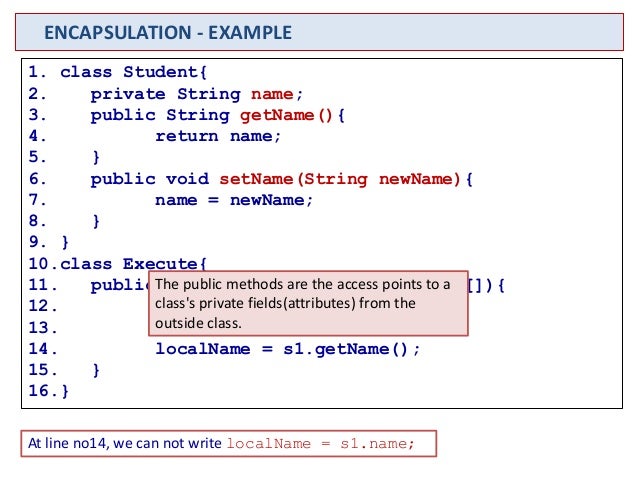
- Encappsulation : in here we build a single unit by combining several things together.for example a capsule contains same or many kind of medicines.but what we see is capsule not all things inside it.

of course to make use of created properties we need to make getters and setters within the class.
simple right ?
Now lets talk about Abstraction
Abstraction :lets start simple ,think of a camera use for photograpy.even though we do not know what happen inside a camera we can take amazing photos...what happened there ?
even though some informations hidden from us like what happen inside a camera we can still get the work done...
next example is
a man driving a car. man only knows that accelerator will increase the speed of car & brakes will stop the car but he does not know how on pressing either will affect, he does not know about the inner mechanism of the car or the implementation of accelerator, brakes etc in the car. This is what abstraction is.
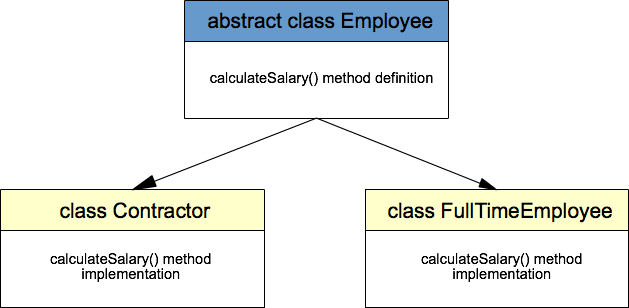
we implement by creating a class that is abstract.

class diagram for abstraction ,
// Java program to illustrate the
// concept of Abstraction
abstract class Shape
{
String color;
// these are abstract methods
abstract double area();
public abstract String toString();
// abstract class can have constructor
public Shape(String color) {
System.out.println("Shape constructor called");
this.color = color;
}
// this is a concrete method
public String getColor() {
return color;
}
}
class Circle extends Shape
{
double radius;
public Circle(String color,double radius) {
// calling Shape constructor
super(color);
System.out.println("Circle constructor called");
this.radius = radius;
}
@Override
double area() {
return Math.PI * Math.pow(radius, 2);
}
@Override
public String toString() {
return "Circle color is " + super.color +
"and area is : " + area();
}
}
class Rectangle extends Shape{
double length;
double width;
public Rectangle(String color,double length,double width) {
// calling Shape constructor
super(color);
System.out.println("Rectangle constructor called");
this.length = length;
this.width = width;
}
@Override
double area() {
return length*width;
}
@Override
public String toString() {
return "Rectangle color is " + super.color +
"and area is : " + area();
}
}
public class Test
{
public static void main(String[] args)
{
Shape s1 = new Circle("Red", 2.2);
Shape s2 = new Rectangle("Yellow", 2, 4);
System.out.println(s1.toString());
System.out.println(s2.toString());
}
}
Right !!! next is polymorphism..
polymorphism: as always let us start simply by understanding what polymorphism is...

polymorphism is perform a single action by different ways.i'm sure you understand it correctly now.
there are 2 types of polymorphism. see the diagram bellow...

now let's see how is the implementation
- class Shape{
- void draw(){System.out.println("drawing...");}
- }
- class Rectangle extends Shape{
- void draw(){System.out.println("drawing rectangle...");}
- }
- class Circle extends Shape{
- void draw(){System.out.println("drawing circle...");}
- }
- class Triangle extends Shape{
- void draw(){System.out.println("drawing triangle...");}
- }
- class TestPolymorphism2{
- public static void main(String args[]){
- Shape s;
- s=new Rectangle();
- s.draw();
- s=new Circle();
- s.draw();
- s=new Triangle();
- s.draw();
- }
- }
thank you for using this blog.i hope you learned all the concepts.i will post more posts as simple as possible.
leave your comments below.


Comments
Post a Comment